
Reference Library
📖 Reference Library
Section titled “📖 Reference Library”The Reference Library is your quick-reference guide while editing the Restaurant Tycoon 3 Wiki.
Instead of searching through multiple websites, you can use this page as a handy cheat sheet for common Source (Wikitext) syntax, formatting, templates, and examples.
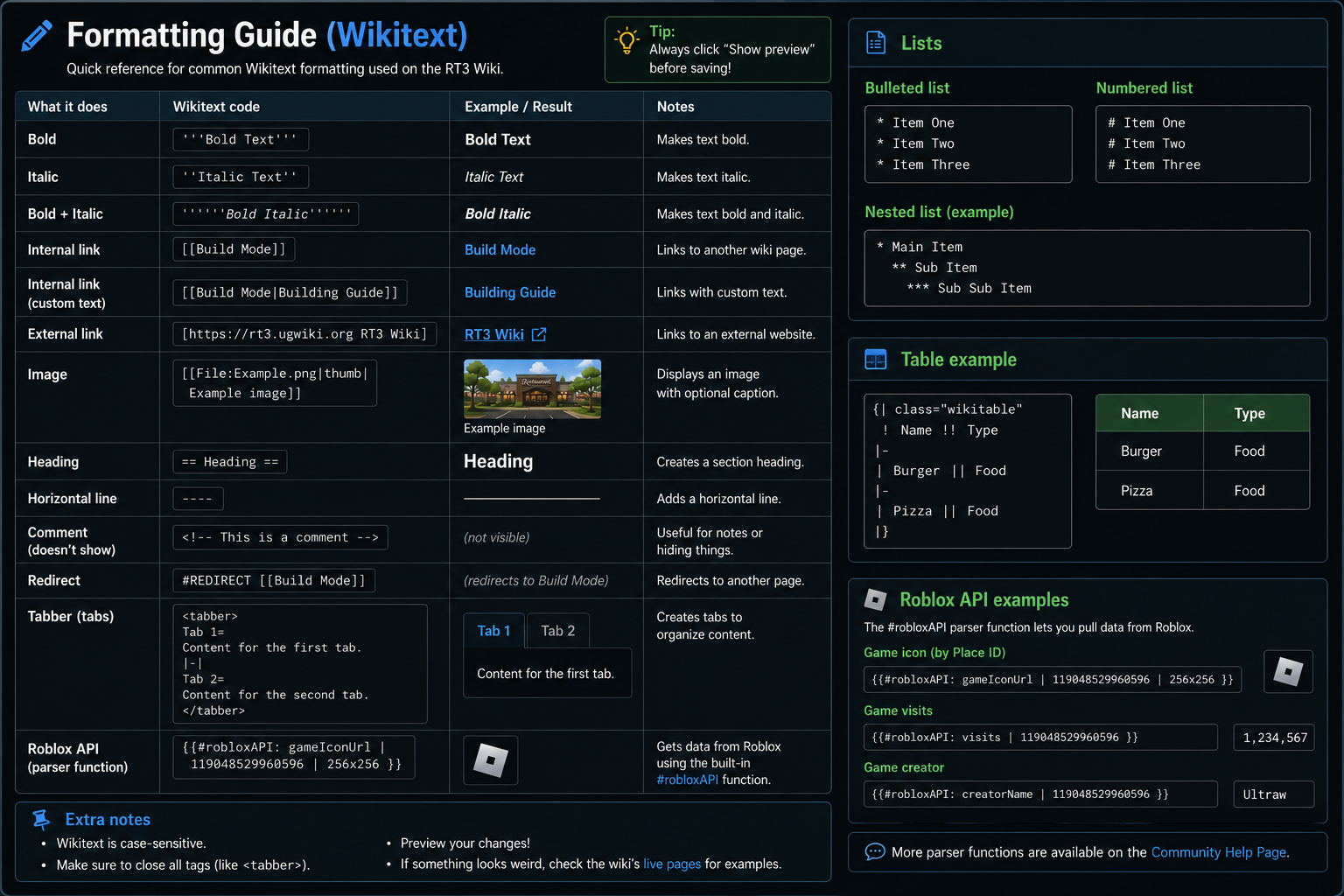
A cheat sheet of Wiki Text (Formatting Guide)
Quick Reference
Section titled “Quick Reference”Looking for something specific? Jump straight to the section you need.
Most commonly used
Section titled “Most commonly used”- 🖼️ Images — Add and format images
- 📊 Tables — Create and format tables
- 📑 Tabbers — Organize information into tabs
Other useful tools
Section titled “Other useful tools”- 🌐 Roblox API — Retrieve information from Roblox
- ↪️ Redirects — Redirect one wiki page to another
✍️ Text Formatting
Section titled “✍️ Text Formatting”| Syntax | Result |
|---|---|
'''Bold''' |
Bold |
''Italic'' |
Italic |
'''''Bold Italic''''' |
Bold Italic |
📑 Headings
Section titled “📑 Headings”Use headings to organise your articles into sections.
== Main Heading ==
=== Subheading ===
==== Smaller Heading ====
🔗 Internal Links
Section titled “🔗 Internal Links”Link to another page on the wiki.
[[Restaurant]]Display custom text.
[[Restaurant|Restaurant Guide]]🌐 External Links
Section titled “🌐 External Links”Link to websites outside the wiki.
[https://example.com Example Website]📋 Lists
Section titled “📋 Lists”Bullet List
Section titled “Bullet List”* Item One* Item Two* Item ThreeNumbered List
Section titled “Numbered List”## First Item## Second Item## Third Item🖼 Images
Section titled “🖼 Images”Basic image.
[[File:Example.png]]Thumbnail with caption.
[[File:Example.png|thumb|Example Caption]]Custom image width.
[[File:Example.png|300px]]📦 Infobox Example
Section titled “📦 Infobox Example”Infoboxes are commonly used to present important information about a page in a structured format.
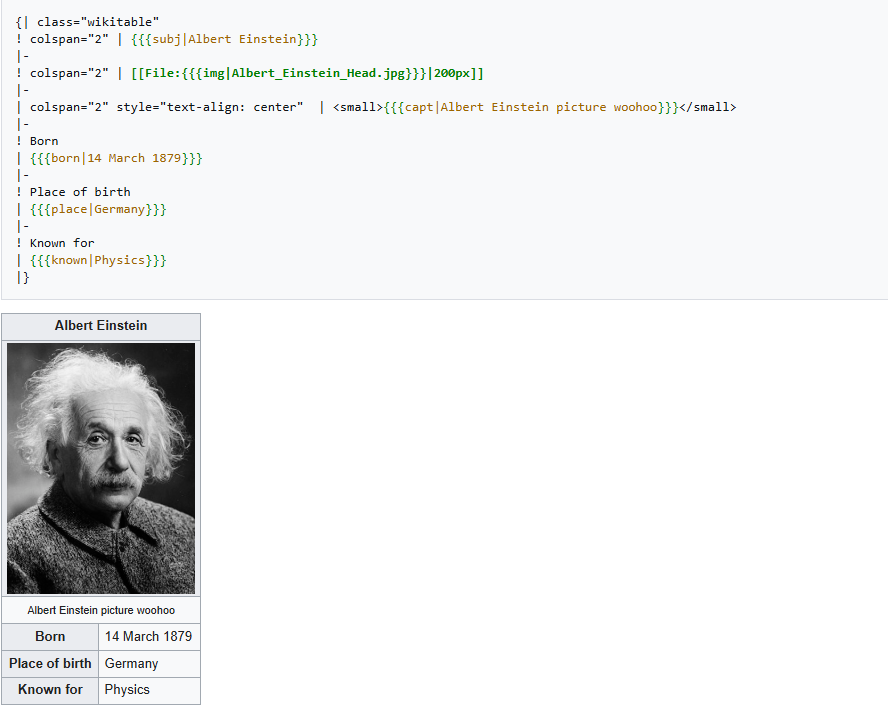
📊 Tables
Section titled “📊 Tables”Basic wiki table.
{| class="wikitable"! Name! Category|-| Burger| Food|-| Pizza| Food|}📦 Templates
Section titled “📦 Templates”Basic template.
{{TemplateName}}Template with parameters.
{{TemplateName|name=Example|image=Example.png}}🌐 Roblox API
Section titled “🌐 Roblox API”The Restaurant Tycoon 3 Wiki has access to a #robloxAPI parser function that can retrieve certain information from Roblox.
For example, it can be used to retrieve a game’s icon:
{{#robloxAPI: gameIconUrl | 119048529960596 | 256x256 }}🔄 Redirects
Section titled “🔄 Redirects”Redirect a page to another page.
#REDIRECT [[Target Page]]Example.
#REDIRECT [[Build Mode]]📑 Tabbers
Section titled “📑 Tabbers”Create multiple tabs within a page.
<tabber>
Overview=Content goes here.
|-|
Gallery=More content goes here.
|-|
Trivia=Additional content.
</tabber>
💬 Comments
Section titled “💬 Comments”Comments are only visible in the source editor.
<!-- This is a comment -->📂 Categories
Section titled “📂 Categories”Place a page into a category.
[[Category:Restaurants]]A page can belong to multiple categories.
[[Category:Restaurants]][[Category:Gameplay]]⭐ Common Editing Workflow
Section titled “⭐ Common Editing Workflow”A typical editing workflow looks like this:
- Open the page.
- Click Edit Source.
- Make your changes.
- Preview your work.
- Check formatting and links.
- Write an edit summary.
- Save your changes.
Following this process helps reduce mistakes and keeps edits organised.
✅ Editing Checklist
Section titled “✅ Editing Checklist”Before saving your edit, ask yourself:
- Have I previewed my changes?
- Are all links working?
- Is the formatting consistent?
- Are templates displaying correctly?
- Did I write an edit summary?
- Have I checked for spelling or grammar mistakes?
A quick review can prevent common editing errors.
📚 Related Pages
Section titled “📚 Related Pages”Need more than a quick reference?
| Page | Purpose |
|---|---|
| Quick Start | Learn the basics of editing. |
| Tips & Tricks | Improve your editing workflow. |
| Questions & Answers | Find solutions to common editing problems. |
| Resource Directory | Browse official documentation and useful websites. |
💡 Keep This Page Bookmarked
Section titled “💡 Keep This Page Bookmarked”As you continue editing, you’ll likely return to this page often. It’s designed to be a fast, practical reference that grows alongside Akcent Docs.
If you discover useful syntax, templates, or editing techniques, consider adding them here to help future editors.